
If you’re wondering how to create an iGaming affiliate website, start with one niche and one target market. Choose a domain and a platform you can maintain, publish a small set of pages that answer real questions, and test your links and tracking before you promote any offers. You can use the same process for casino, sportsbook, poker or eWallet content.
Key Takeaways for Affiliates
Pick one audience, market and language. Check which offers accept traffic from that market and allow promotion on your website.
Start with one useful guide and two related pages. Give each page a specific question to answer and link them where it helps the reader.
Check Google Search visibility, on-site activity and affiliate attribution in the tools that report each stage.
How iGaming Affiliate Marketing Works
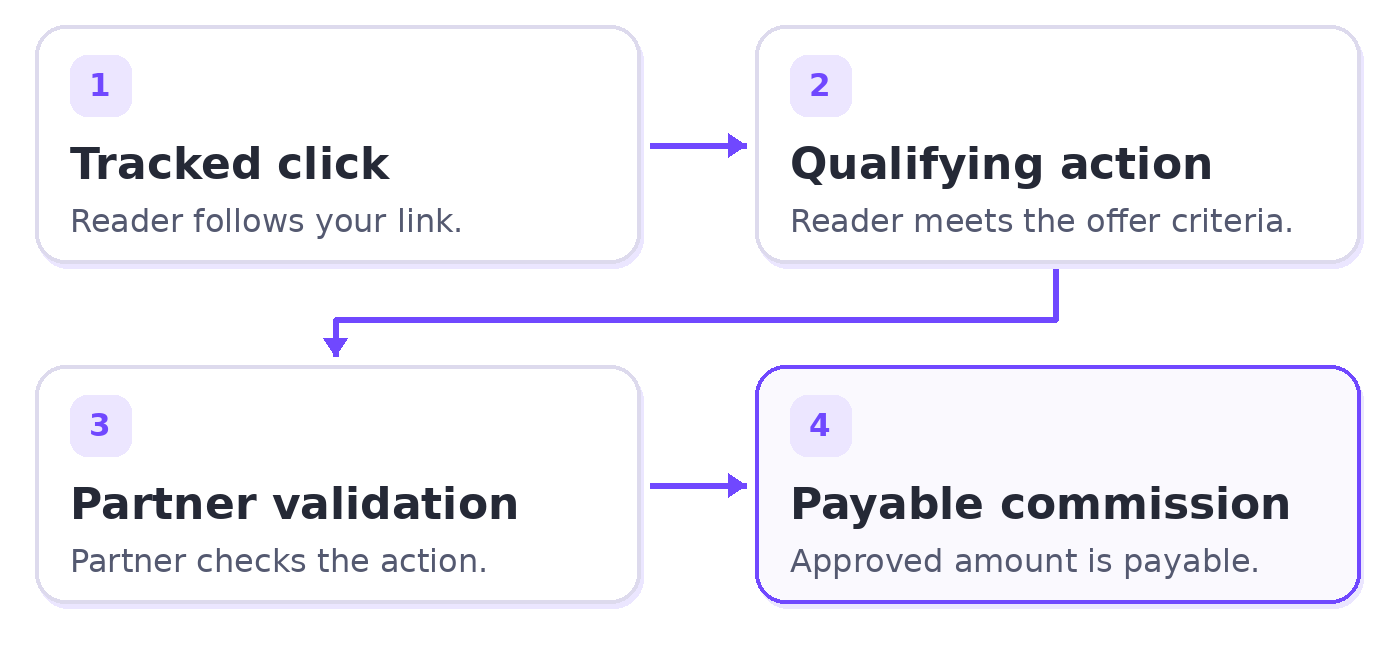
In iGaming affiliate marketing for beginners, the first thing to understand is how a program connects a visitor’s action to your site. A visitor reads your page and follows a link that identifies you as the affiliate. If they complete a qualifying action, the partner can attribute it to your link. The partner then validates the action according to the offer terms before any associated commission becomes payable. A first-time deposit may be part of the requirements. Some offers also require minimum activity or other checks. Paynura’s tracking and commission terms explain how this works on the network.
CPA (cost per acquisition) pays a fixed amount for an approved qualifying action. Check what the referred customer must do and when the partner validates it.
RevShare (revenue share) pays an agreed percentage of revenue as defined in the offer. Check which deductions apply and whether a negative balance can carry into the next period.
Hybrid combines CPA and RevShare. Check the terms of each component, including the qualifying action and the revenue calculation.
The Paynura affiliate marketing glossary explains related terms you’ll see when comparing offers.
Choose Your Niche and Target Market
If you’re deciding how to start a gambling affiliate website, pick a specific reader question and one market where you can answer it accurately. Start with a vertical you understand, then look at the pages already appearing for the question. Look for a detail you can explain more clearly, such as how wagering terms work or how to compare tournament schedules across time zones.
Before choosing an offer, check the local rules that apply to your site and whether the operator or provider can serve your audience. Confirm that the program accepts your target market and website traffic. For an eWallet site, check country availability, fees and limits directly with the provider before writing about them.
iGaming Affiliate Website Examples
Vertical | Reader question | First useful page |
|---|---|---|
Casino | What should I check before claiming a welcome bonus? | A guide to wagering requirements, expiry dates and game restrictions |
Sportsbook | Which sportsbooks cover the league I follow? | A comparison of market coverage for one league, based on published information |
Poker | Which poker rooms run low-buy-in tournaments at times I can play? | A comparison of published schedules, buy-ins and time zones |
eWallets | What fees and limits should I check before using an eWallet? | A guide to fees and limits for one market, based on provider documentation |
Set Up Your Domain and Publishing Platform
Start your iGaming affiliate website setup with a short, memorable domain that fits the subject and gives you room to cover related questions. Check that you can connect your own domain to the plan you choose. Set up the main navigation, preview a draft on your phone, and make sure you can edit its URL and search metadata before publishing.
AI website builders such as Framer and Webflow can generate a starting layout from a short description. For an affiliate site built around organic search, check how the platform handles the work you’ll do every week: publishing articles, updating comparisons and testing links. Framer AI · Webflow’s AI site builder
What to check | Try this before choosing a platform |
|---|---|
URLs and search metadata | Create a draft and edit its URL slug, SEO title and meta description. Check that public articles can be indexed. |
Templates and content | Publish a guide with headings, links and a comparison table. Reuse its layout for a second article and test how easily you can update both. |
Publishing and tracking | Check that the plan supports a custom domain and your analytics setup. Preview on mobile and test an outbound link. |
If you use a prompt-based app builder such as Lovable, test the same publishing workflow on a sample article. Check how individual pages get their own metadata and appear in the sitemap before committing to the platform. Lovable’s SEO documentation
Plan Your First Pages and Publish Three Related Pieces
Build a homepage that explains who the site is for and points readers to the main guide. Add an About page that explains who publishes the site and how you check information. Make contact details easy to find, write an affiliate disclosure, and include the privacy or cookie information that applies to your setup and market.
For the first three editorial pages, use one guide, one explainer and one comparison. Here’s an example for a site about low-buy-in online poker tournaments.
Publish a guide to reading poker tournament schedules. Pick one target market. Check which poker rooms serve it, then use their published schedules to explain time zones, registration windows and buy-ins.
Add a guide to tournament buy-ins and fees. Link to it from the first guide where you explain what the advertised entry price includes.
Publish a comparison of low-buy-in tournament schedules. Use the same time zone across entries, show when you checked each schedule, and link back to the fee guide where readers need that detail.
Give each page a descriptive title and add links to related pages as they go live. Check the first published URL in Search Console and use the search performance report over time to see which pages and available queries are getting impressions. Use those signals to decide which questions deserve clearer answers or a follow-up page. Google Search Console performance report
Test Affiliate Link Tracking Before Launch
Pre-launch checklist
Open your pages on a phone. Check navigation, text, tables and links.
Put your affiliate disclosure where readers can see it before or alongside the relevant promotion, following the rules for your market.
Open each affiliate link and confirm it lands on the intended page. Check the URL or link settings against the tracking ID or link supplied by the program.
Check that your public pages can be indexed. Inspect a live URL in Search Console and submit the sitemap if your platform provides one.
Test a click on your site and confirm your outbound event appears in GA4 if you’ve configured it. Check the affiliate dashboard for the test click if the program reports clicks, allowing for its reporting delay.
Ask the program how to verify conversion attribution if you need to test it. Use its approved process.
Where to Check Each Part of the Journey
Tool | What it tells you |
|---|---|
Google Search Console | Which pages received impressions and clicks in Google Search. Use URL Inspection to check an individual page’s indexing status. |
GA4 | What visitors do on your site, including outbound clicks when measurement is enabled and the link is recorded as outbound. |
Affiliate dashboard | Which actions the program attributed to your link and what it reports as pending or approved. Click and conversion reporting vary by program. |
If GA4 shows an outbound click and you expect the affiliate dashboard to show it too, check the link destination, the tracking ID and the program’s reporting delay. For a payable commission, check the status reported by the program. Google’s guide to GA4 outbound clicks · Paynura’s affiliate tracking guide
Frequently Asked Questions
Do I need WordPress?
No. A hosted AI website builder can work if you can publish and update articles, control page URLs and search metadata, and connect your measurement tools. Test one article from draft to publication before choosing a plan.
How many pages do I need to launch?
A practical starting point is a homepage, About and contact information, the disclosures and privacy information your site needs, and three related editorial pages. The editorial pages should answer different questions for the same audience so readers have a reason to move between them.
Can I start before joining an affiliate program?
Yes. You can publish educational guides, build out your site and set up Search Console while you evaluate programs. When you’re ready to promote an offer, check its terms for your market and traffic source, add the tracking link supplied by the program, and test it on the published page.
Explore Affiliate Offers for Your Niche
Once you know who your site is for, look for offers that fit what your readers are trying to do. Paynura is an iGaming affiliate network with casino, sportsbook, poker and eWallet opportunities. Check market eligibility and the qualifying action for each offer you’re considering. Sign up to explore Paynura’s affiliate offers.